

Divi From Elegant Themes

Product Name: Divi Theme
Summary
Is Divi really worth it for your WordPress website? Read my in-depth Divi Theme review, where I share my real design experiences and explain my favorite settings. You can make a decision with it!
What makes a WordPress theme truly worth using? Is it the design, the customization options, the ease of use, or simply how it feels when you start building your dream site?
Having blogged for more than a decade, I have a good design experience with several WordPress themes. A good theme should give you the freedom to create the website as you wish without complicating the process.
That’s what made me use the Divi theme!
In my Divi theme Review, I’m sharing my experience from a blogger’s perspective. I’ll tell you about its interface, Divi Builder, customization options, layouts and templates, ease of use, and overall website-building experience.

I know you have many questions to be cleared, and come over here!
Is Divi really as flexible as it claims to be? Is it easy for someone without coding knowledge? Is Divi still a good WordPress theme for bloggers and website owners? Is it fast and good for SEO? Is the theme overpriced?
As I’ve spent many years designing and managing my own and clients’ websites, I’ll answer your questions, and I hope it will help you make the right decision.
Table of Contents
Divi Theme – Quick Intro
Divi is a stunning WordPress theme and visual page builder developed by Elegant Themes.
Instead of designing through the standard WordPress editor, it lets you build pages using sections, rows, columns, modules, templates, presets, and other design elements. You can see your design while working on it rather than switching between the editor and a preview window.
Divi is not a new theme in the WordPress market! However, it is not the same as before.
The latest version, Divi 5, introduces a redesigned architecture, a faster Visual Builder, a new design system, more responsive controls, improved performance features, AI-powered tools, and a growing collection of modern modules.
However, it is not an ideal choice for everyone!
I recommend the Divi theme for freelancers, agencies, bloggers, WooCommerce, and membership site owners who want to build multiple websites without learning a complicated coding workflow. If you want to make a simple website, you need to choose a theme with minimal customization options.
Now, I will explain why it remains a very strong option for them!
As of August 2026, the latest Divi 5 includes useful modules like Gravity Forms, Charts, and Payment Button. It also included bug fixes and improvements to existing functionality.
After looking at the latest version of Divi, its features, performance tools, design workflow, pricing, compatibility, SEO considerations, and limitations, my ratings are
| Category | Rating |
| Ease of use | 4/5 |
| Visual Builder | 4.5/5 |
| Design flexibility | 4.5/5 |
| Responsive design | 4.5/5 |
| Templates | 4/5 |
| Theme Builder | 4/5 |
| SEO friendliness | 3.5/5 |
| WooCommerce | 4/5 |
| Third-party ecosystem | 3.5/5 |
| AI features | 4/5 |
Overall: 4.0/5
Strengths: Flexibility, visual design, reusable systems, client workflow, and value.
Weaknesses: The learning curve that comes with that flexibility. Also, you need to check Divi 5 compatibility when using older third-party modules.
Now, let me share my personal experience with Divi and highlight the areas I’ve enjoyed the most.
After using Divi to design my blogs and online stores, I’ve particularly admired a few features and design aspects. These are the reasons I wrote this Divi WordPress theme review for you!
My Divi Design Experience: Features I Like Most
Usually, I don’t look at how a theme looks in a demo. I want to know how easy it is to build a real website, change its design later, keep pages consistent, and make everything look good on mobile devices.
This is where Divi has impressed me the most!
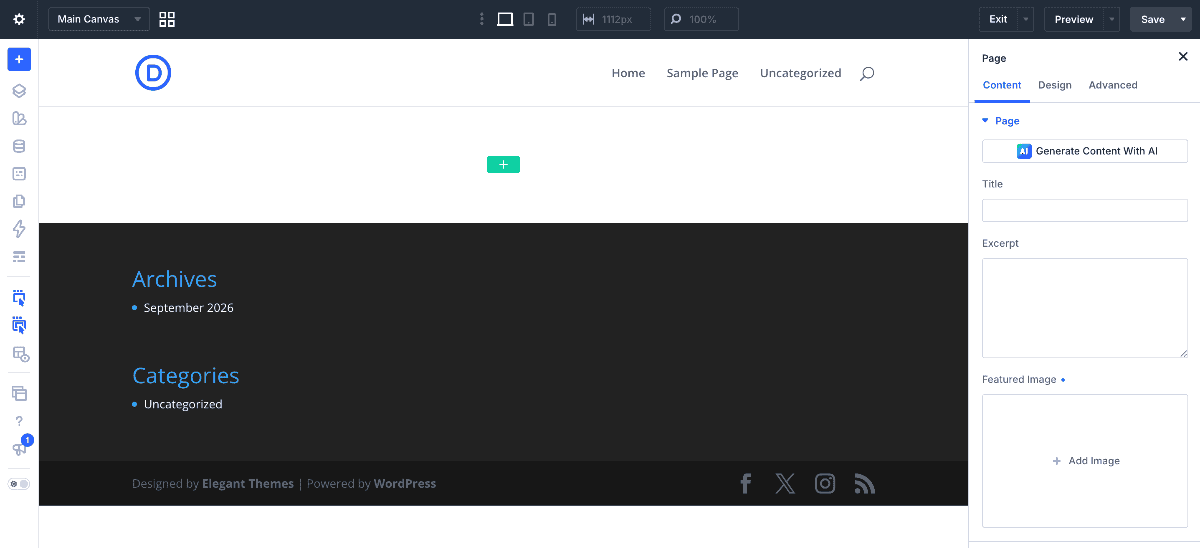
Below, I want to show you some of my favorite Divi features along with screenshots from my own site setup. So, you can see how the interface and design process actually looks.
1. The Visual Builder
The first thing I liked about Divi is its visual approach to website design!
Instead of constantly moving between the WordPress editor and a separate settings page, I can work directly on the page and see the changes as I make them.
Its Visual Builder is designed around front-end drag-and-drop editing, so my work is visible. This makes a difference when working on my blog layout.
Get into the builder interface, WordPress Dashboard > Pages > Add A Page > Use Divi Builder