

Rank Math

Product Name: Rank Math
Summary
Want higher Google rankings without hiring an SEO expert? Rank Math gives you smart optimization tools, automation, and real-time SEO suggestions in an easy dashboard. Start optimizing smarter and see the results!
With 15 years as a professional blogger optimizing sites for Google dominance, I’ve scrutinized every major WordPress SEO plugin. Over the years, I’ve ranked competitive keywords across multiple niches and built content strategies that consistently drive organic traffic and revenue.
I’ve worked with the SEO plugins like Yoast and All in One SEO for my client and personal projects. It’s not just for testing environments! I have analyzed their impact on crawlability, schema implementation, on-page optimization, and Core Web Vitals. I have done the same with the Rank Math SEO plugin as well.
Rank Math emerges as a standout, delivering enterprise-grade on-page SEO optimization without the bloat. In this detailed Rank Math review, I’ll share real-world results, technical insights, setup best practices, pros & cons, discounted pricing, and advanced optimization tips based on years of hands-on experience.

This is not a surface-level overview! This is a professional breakdown designed to help you decide whether the Rank Math plugin is right for your WordPress site or not. Let’s begin with a quick introduction!
Table of Contents
Rank Math – Quick Intro
Rank Math, founded by SEO veterans Bhanu Ahluwalia and Nimit Kashyap, now powers 3+ million active WordPress installations. Since its launch, it has gained popularity for its modular framework and AI-driven SEO features.
It excels at Google Search Console integration, Core Web Vitals monitoring, and technical SEO audits, all of which are essential for maintaining rankings in 2026’s algorithm landscape.
Unlike older SEO plugins that evolved slowly, Rank Math entered the market aggressively, focusing on automation, deep schema integration, and feature consolidation.
It replaces multiple plugins at once:
- On-page SEO plugin
- Schema plugin
- Redirection manager
- 404 monitor
- XML sitemap generator
- WooCommerce SEO enhancer
- Analytics dashboard
- Internal linking plugin (newly added)
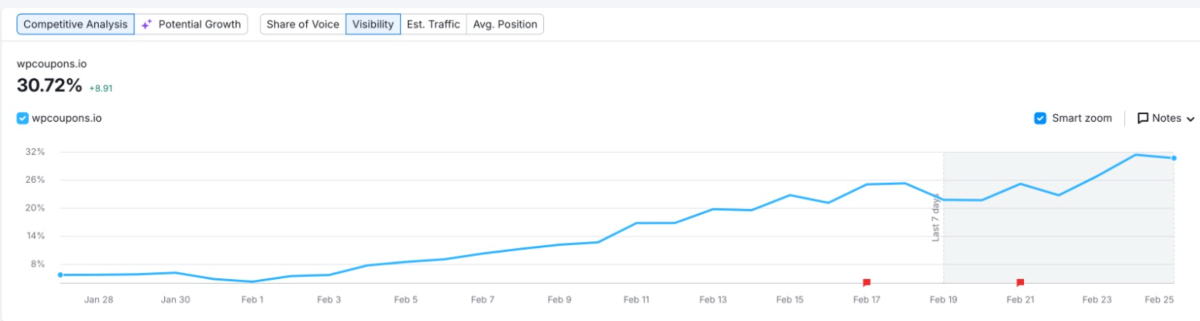
My Experience – Its lightweight footprint (under 500KB) ensures no performance drag, a critical factor I’ve measured across benchmarks that showed 30% organic visibility gains.