
Are you wondering whether Kadence Theme is actually worth using for your WordPress site? Is this theme comfortable to use?
Does it feel intuitive, or does it slow you down with complicated settings? What makes Kadence stand out in a crowded WordPress theme market?
In this in-depth Kadence Theme review 2026, I’ll share my experience after using it on multiple blogs.
As I have been blogging for over a decade, I have had opportunities to build personal blogs, affiliate-based niche sites for my clients, and WooCommerce stores.
During this journey, I’ve tested popular WordPress themes ranging from heavy multipurpose to minimal performance-focused ones.
Finally, I’ve learned that comfort matters just as much as speed or SEO. Kadence felt familiar from the start.
Here is my quick conclusion, if you’d like to know my viewpoint about the Kadence theme.
Table of Contents
- Quick Verdict: Is Kadence Theme Worth It?
- What Is Kadence Theme?
- My Experience Using Kadence Theme
- Performance & Speed: Truly Shines
- SEO Friendliness: Built the Right Way
- Design & Customization: Surprisingly Powerful
- Starter Templates: Useful but Not Overwhelming
- WooCommerce Compatibility
- Kadence Theme Free Installation & Settings
- Kadence Pro Theme Settings Explanation
- Kadence Free vs Pro Theme
- Kadence Theme Free vs Pro: Key Differences
- Kadence vs Other Popular Themes (My Opinion)
- Kadence Pro Theme Pricing Plans
- Kadence Blocks
- Pros and Cons of Kadence Theme
- Kadence WordPress Theme – FAQs
- Kadence Theme: My Honest Opinion
Quick Verdict: Is Kadence Theme Worth It?
Short answer: Yes! If you value performance, SEO, and a clean design that doesn’t rely on bloated page builders.
From a long-term blogging and site-building perspective, Kadence gets the fundamentals right. It’s fast without feeling restrictive, flexible without becoming overwhelming, and modern without locking you into unnecessary complexity.
Kadence strikes a rare balance between:
- Lightweight, performance-focused code
- Deep yet logical customization options
- A true Gutenberg-first workflow
- Practical features that bloggers actually use in real projects
That balance is why Kadence has earned my trust.
It’s one of the few WordPress themes I can confidently recommend for dedicated bloggers and content-driven websites where speed, usability, and long-term scalability actually matter.
Now, let’s get into a detailed theme view!
What Is Kadence Theme?
Kadence is a modern, lightweight WordPress theme that prioritizes speed, clean code, and a smooth Gutenberg-based workflow for building content-driven websites.
Unlike older themes that were retrofitted to “support” Gutenberg, Kadence feels like it was built for the current and future direction of WordPress.
Kadence focuses on:
- Clean, semantic HTML
- Minimal CSS and JavaScript
- Deep native WordPress Customizer controls
- Seamless integration with Gutenberg blocks
Its free version is available on WordPress.org and the Pro version unlocks advanced features for power users and professionals.
My Experience Using Kadence Theme
When I evaluate a WordPress theme, I’m not impressed by flashy demos. I look at:
- How fast does a site load on real hosting
- How much control do I have without writing custom CSS
- Whether the theme helps or hurts SEO
- How it feels after months of publishing content
Kadence passed all of these tests better than most themes I’ve used. From a blank install, the theme feels clean, fast, and uncluttered.
There’s no forced layout, no unnecessary design opinion imposed on you, which is exactly what a professional blogger wants.
Performance & Speed: Truly Shines
Speed is non-negotiable for me. Google Core Web Vitals, user experience, and conversions all depend on it. Kadence is one of the lightest WordPress themes I’ve tested on live website.
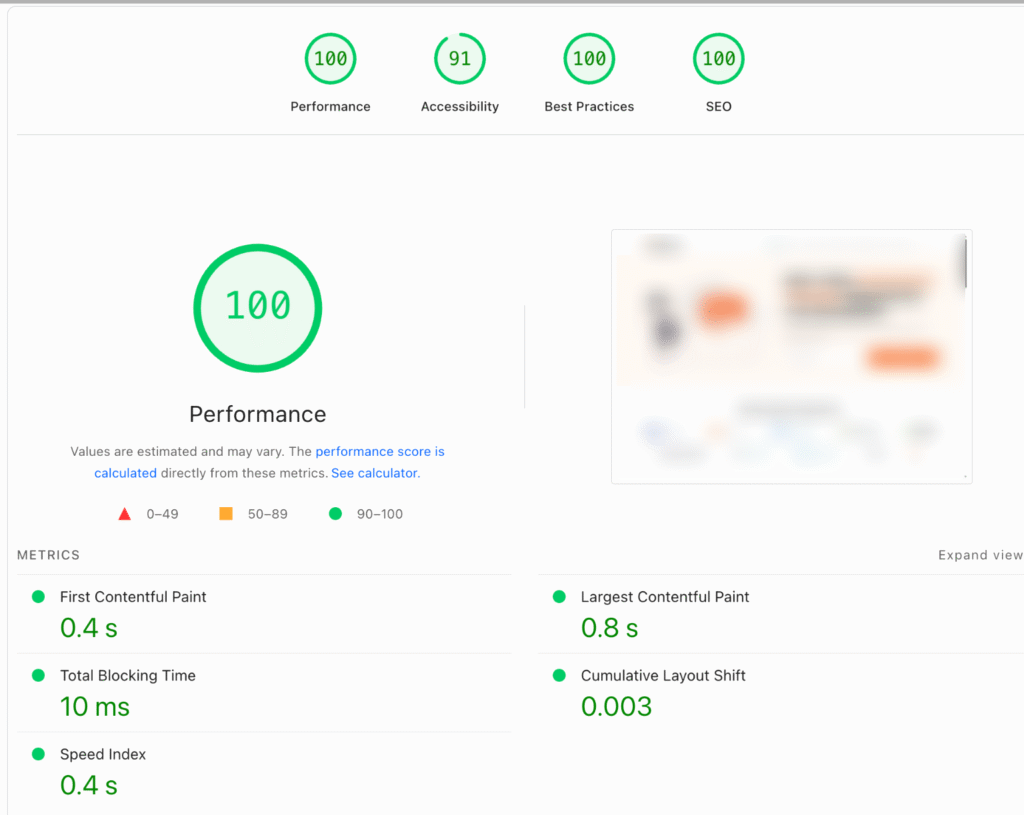
Why Kadence Is Fast:
- Minimal CSS and JavaScript
- No dependency on heavy page builders
- Smart asset loading (only loads what’s needed)
- Clean DOM structure
On a fresh install with basic content, Kadence consistently delivers excellent PageSpeed and Core Web Vitals scores, even before aggressive caching or optimization.
If you’re building an SEO-focused blog, you will adore the Kadence theme performance.
SEO Friendliness: Built the Right Way
A WordPress theme doesn’t do SEO for us! But it absolutely sets the foundation. A poorly structured theme can quietly undermine our efforts, while a well-built one makes optimization easier without getting in the way.
From a design and development standpoint, Kadence is SEO-friendly by structure. It focuses on clean markup, logical hierarchy, and performance, which are the aspects that search engines and users respond to.
SEO Advantages I’ve Observed in Practice
- Proper heading hierarchy (H1–H6) that respects content structure and avoids common markup issues
- Clean, semantic HTML that keeps the DOM lean and readable
- Schema-ready foundation, allowing SEO plugins to add structured data correctly
- Fast load times, which directly support Core Web Vitals and rankings
- Excellent compatibility with Rank Math, Yoast, and other leading SEO plugins
What I appreciate most is what Kadence doesn’t do. It doesn’t override metadata, inject unnecessary schema, or force its own SEO logic.
Instead, it stays out of the way and lets you control titles, descriptions, breadcrumbs, indexing, and structured data through the SEO plugin that you have installed.
Design & Customization: Surprisingly Powerful
This is where Kadence surprised me the most.
Without touching code, I was able to:
- Create custom headers and footers
- Control typography globally
- Adjust spacing site-wide
- Design clean blog layouts
- Customize mobile and desktop views separately
Kadence includes a drag-and-drop header/footer builder that works directly inside the WordPress Customizer.
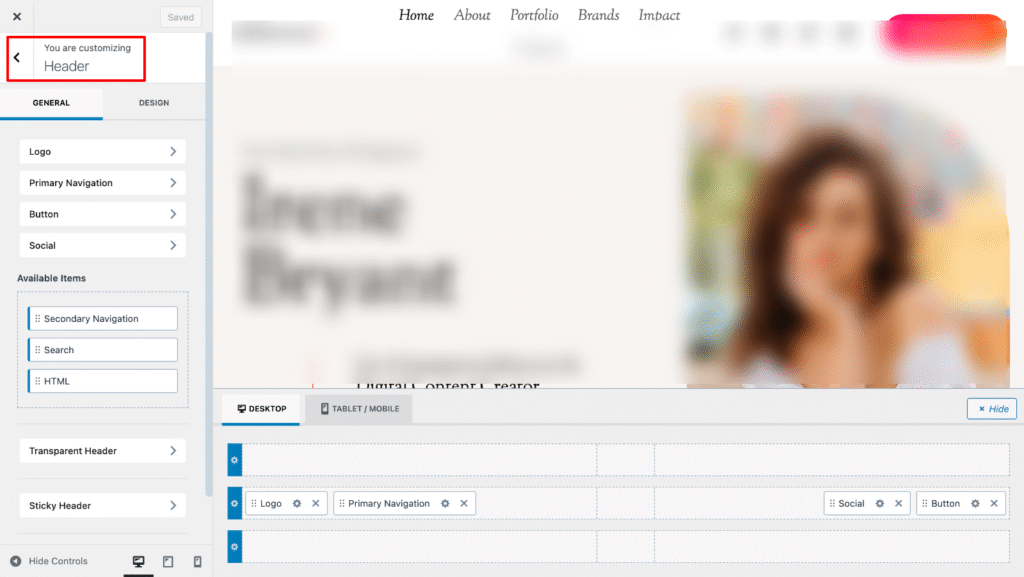
We can add:
- Logos
- Menus
- Buttons
- Search icons
- Social icons
- Custom HTML
This eliminates the need for the extra WordPress plugins.
Starter Templates: Useful but Not Overwhelming
Kadence offers a library of starter templates for blogs, businesses, and niche sites. I see these as a starting point, not a requirement.
To use the free templates, visit WordPress Dashboard > Appearance > Kadence > Starter Templates
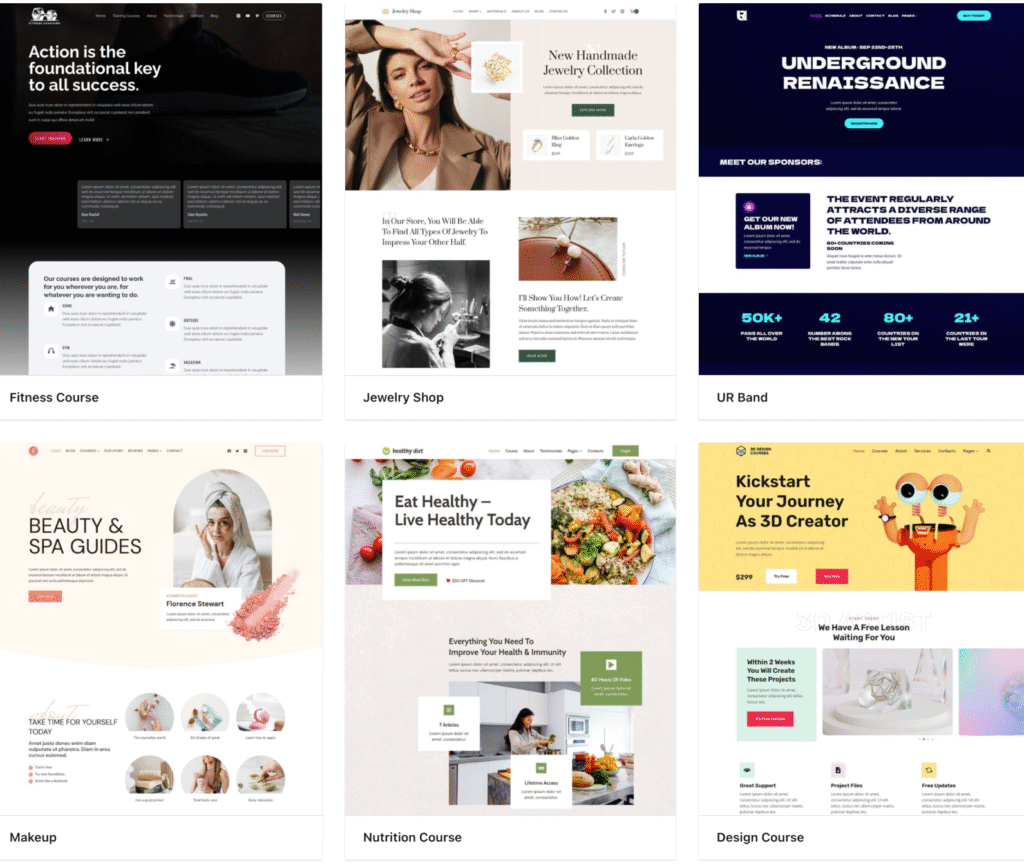
For beginners, they save time. For experienced bloggers, they’re optional.
Importantly, Kadence doesn’t force you into demo content or rigid layouts, which I consider a significant advantage.
WooCommerce Compatibility
While I primarily focus on content sites, I’ve tested Kadence with WooCommerce as well.
Kadence handles WooCommerce cleanly:
- Optimized product layouts
- Custom shop controls
- Lightweight structure
- No unnecessary styling conflicts
If you’re running a blog with a small store or digital products, Kadence is more than capable.
Kadence Theme Free Installation & Settings
The Kadence free theme offers powerful theme customization settings compared to other free WordPress themes. This lightweight WordPress theme is highly suitable for blogs, businesses and basic eCommerce stores.
Free Theme Installation
Step 1: Log in to your WordPress admin and go to Appearance > Themes.
Step 2: Click Add New at the top. Search for “Kadence”.
Step 3: Click Install > Activate. (You may also upload the theme file manually)
Step 4: Go to Appearance > Customize to start editing your site design.
Kadence WP Theme Free Version Settings

Let me explain the Customizer shortcuts of the Kadence Free theme!
1. Global Colors
Purpose – Sets the core color system for your entire website.
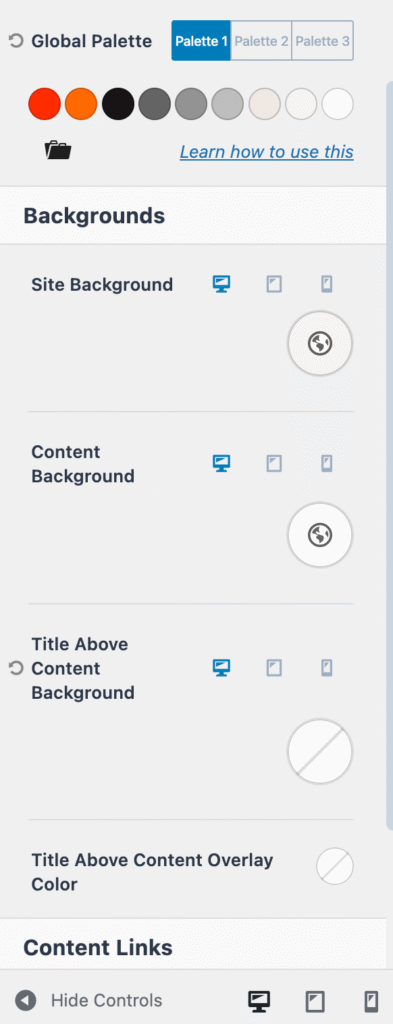
What you control:
- Primary, secondary, and accent colors
- Text colors
- Background colors
- Border colors
How it works – These colors are used across headers, buttons, links, blocks, and layouts. Changing a global color updates every element using that color automatically.
Why it’s important – Keeps your branding consistent and makes site-wide color changes fast and easy.
2. Branding
Purpose – Controls your site identity and logo setup.
What you control:
- Site logo
- Mobile logo
- Sticky header logo
- Site title and tagline
- Logo width and spacing
How it works – You can upload different logos for different header states (normal, sticky, mobile).
Why it’s important – Ensures professional branding across devices and scrolling behavior.
3. Typography
Purpose – Manages all fonts and text styles across the site.
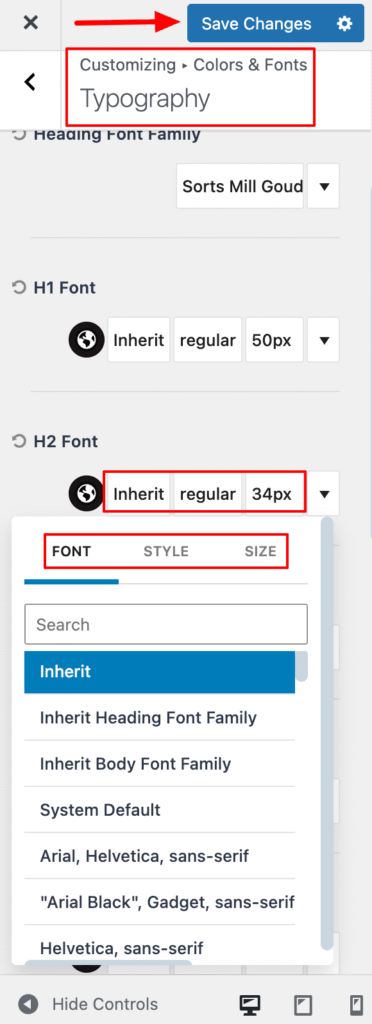
What you control:
- Body text font
- Headings (H1–H6)
- Navigation menu text
- Buttons text
- Form fields
Typography options include:
- Font family
- Font weight
- Font size (desktop/tablet/mobile)
- Line height
- Letter spacing
- Text transform
Why it’s important – Improves readability and creates a visual hierarchy without editing individual pages.
4. Header Layout
Purpose – To work with the Kadence Header Builder.
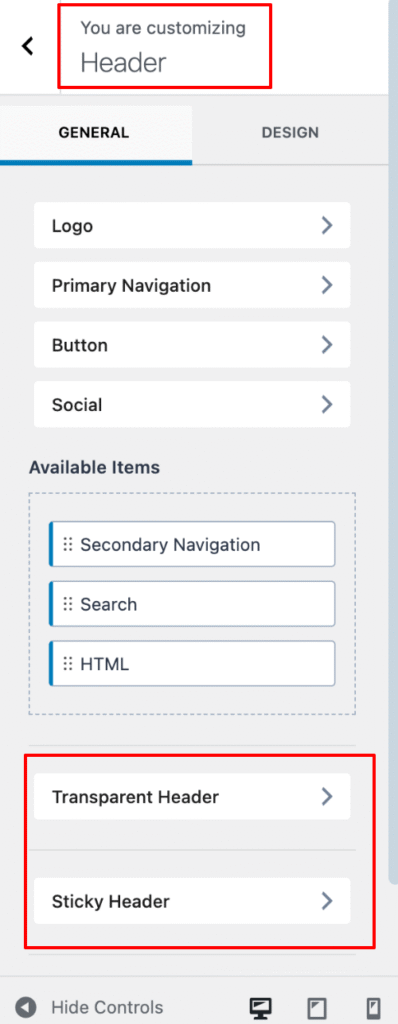
What you control:
- Header structure (rows and columns)
- Logo placement
- Navigation menus
- Buttons, icons, search, cart
- Sticky and transparent headers
How it works – Drag and drop elements to build your header visually.
Why it’s important – Gives full control over how your header looks and behaves.
5. Page Layout
Purpose – Controls the default layout for pages.
What you control:
- Page width
- Sidebar position or removal
- Page title display
- Content spacing
Why it’s important – Ensures consistent layout across all pages.
6. Footer Layout
Purpose – Opens the Kadence Footer Builder.
What you control:
- Footer columns and rows
- Widgets and menus
- Copyright text
- Custom HTML
How it works – Just like the header builder, you drag and arrange elements visually.
Why it’s important – Creates flexible and professional footer designs.
Kadence Pro Theme Settings Explanation
In my unbiased Kadence WordPress theme review, I will explain the premium settings options and their importance.
I never had the sense that I needed a page builder just to create a clean, professional layout.

7. Header Addons
Purpose – Extends the Header Builder with extra elements.
Adds:
- More header elements (icons, buttons, dividers, etc.)
- Advanced styling options
Why it’s important – Enables advanced header designs without plugins or code.
8. Conditional Headers
Purpose – Allows you to create multiple headers for different situations.
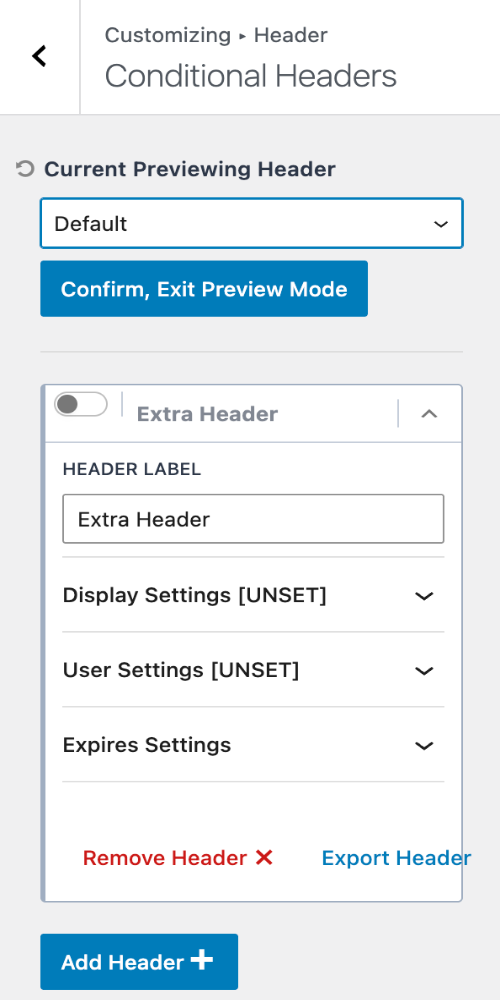
Examples:
- One header for the homepage
- A different header for blog posts
- Custom headers for landing pages
Why it’s important – Perfect for marketing pages and custom layouts.
9. Ultimate Menu
Purpose – Enhances WordPress navigation menus.
Adds:
- Mega menus
- Menu icons
- Highlight labels (New, Hot, Sale)
- Column-based dropdowns
Why it’s important – Improves navigation and user experience on large sites.
10. Header/Footer Scripts
Purpose – Allows adding scripts without editing theme files.
Common uses:
- Google Analytics
- Facebook Pixel
- Chat widgets
- Verification scripts
Why it’s important – Safe and update-proof script management.
11. Hooked Elements
Purpose – Insert content conditionally anywhere on the site.
You can add:
- Text or HTML
- Blocks
- Shortcodes
- Dynamic content
Display rules include:
- Specific pages
- Entire site
- User roles
- Devices
Why it’s important – Replaces child themes and code snippets.
12. WooCommerce Addons
Purpose – Adds advanced WooCommerce design controls.
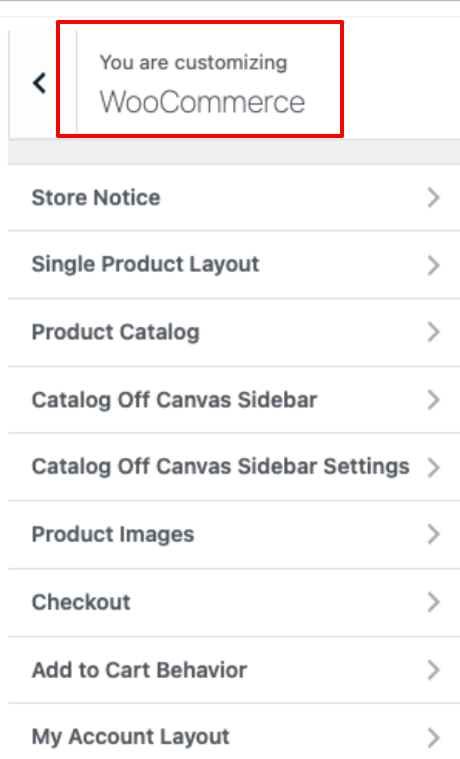
Includes:
- Product gallery layouts
- Sticky add-to-cart
- Cart icon in header
- Checkout layout styling
How it works – Allows you to create custom page and auto-open side cart feature for high-conversions.
Why it’s important – Creates conversion-focused online stores.
13. Infinite Scroll
Purpose – Automatically loads more posts on archive pages.
Works on:
- Blog pages
- Category archives
- Search results
Why it’s important – Improves user engagement and browsing experience.
14. Color Palette Switch (Dark Mode)
Purpose – Adds a light/dark mode toggle to your site.
How it works:
- Uses a second color palette
- Users can switch modes manually
Why it’s important – Modern UX features and accessibility improvement.
15. Local Gravatars
Purpose – Loads Gravatar images from your own server.
Benefits:
- Faster loading
- Better privacy
- Reduced external requests
Why it’s important – Improves site performance and compliance.
16. Archive Custom Settings
Purpose – Allows custom layouts for taxonomy archives.
Applies to:
- Categories
- Tags
- Custom taxonomies
Why it’s important – Gives design control over archive pages instead of using a global layout.
This Kadence Pro dashboard acts as a Customizer shortcut hub and feature toggle panel for Pro modules. Each toggle unlocks new Customizer sections, allowing deep customization without code.
Kadence Free vs Pro Theme
One of the most common questions I get is whether the Kadence Free version is enough or if you really need Kadence Pro.
Having used both extensively, here’s my perspective from a practical, real-world blogging and site-building point of view.
When Kadence Free Is Enough
The free version is surprisingly capable. It’s ideal if:
- You’re just starting a blog or small website
- You want a fast, lightweight, and clean theme
- You’re comfortable with basic customization via the Customizer
- You don’t need advanced header/footer layouts or conditional logic
For many bloggers, the free version is more than sufficient to build a professional-looking site without touching code.
When Kadence Pro Makes Sense?
Kadence Pro unlocks advanced functionality for those who want greater control, flexibility, and scalability. Consider it if:
- You need advanced header elements (sticky headers, mobile-specific headers, custom layouts)
- You want conditional headers or footers (different designs for different pages, posts, or user roles)
- You require deeper layout control, including container settings, hooks, and custom spacing
- You build multiple sites, client projects, or complex blogs that require reusable templates
From my experience, the Pro version is reasonably priced for the long-term flexibility it provides, especially if you manage multiple websites or need advanced design control without extra plugins.
Kadence Theme Free vs Pro: Key Differences
| Feature | Free Version | Pro Version |
|---|---|---|
| Header/Footer Builder | Basic header & footer layouts | Advanced headers, sticky headers, mobile headers, and conditional headers |
| Starter Templates | Limited selection | Full library of premium starter templates |
| Layout Controls | Basic site/container settings | Advanced layout controls including hooks, spacing, and visibility rules |
| Custom Fonts & Typography | Google Fonts only | Full typography control with premium fonts & global settings |
| WooCommerce Enhancements | Basic WooCommerce support | Product page customization, cart/checkout design, and shop-specific options |
| Advanced Elements | None | Hooks, custom buttons, call-to-action elements, and global colors |
| Support & Updates | Community support | Priority support, updates, and premium features |
If you’re building a professional blog, niche site, or client project, investing in Kadence Pro pays off quickly because it reduces reliance on additional plugins and gives you design freedom while maintaining performance.
Kadence vs Other Popular Themes (My Opinion)
I’ve used Astra, GeneratePress, and Blocksy extensively. Here is my genuine opinion about these Kadence theme alternatives.
Kadence vs Astra
- Kadence feels more modern and Gutenberg-focused
- Astra has more demos, but more bloat
Kadence vs GeneratePress
- GeneratePress is ultra-minimal
- Kadence offers more design flexibility without sacrificing speed
Kadence vs Blocksy
- Blocksy has strong design features
- Kadence feels more stable and content-centric
For blogging and SEO projects, Kadence hits the best balance for me.
Kadence Pro Theme Pricing Plans
KadenceWP offers multiple paid plans that not only unlock Kadence Theme Pro features but also bundle other premium tools (like Blocks Pro, Starter Templates, and marketing addons).
Plans are mostly annual subscriptions, and they come with updates, support, and a 30-day money-back guarantee. And, I have a 15% special discount for you; use the official code and claim the price-cut offer.
1. Express Plan – Best Starter Plan
- Price: $69/year (billed annually)
- Offer Price: $59/year
- Site Limit: Up to 3 sites
- What You Get:
– Access to premium starter templates and premium pattern designs
– Creative kits, custom fonts, CAPTCHA, basic blocks enhancements
– Inline AI tools and design tools to jumpstart site building
– Standard support & updates
Who it’s for: Beginners and small projects that want premium templates and design tools without buying everything.
2. Plus Plan – Essential Builder Bundle
- Price: $169/year
- Offer Price: $144/year
- Site Limit: Up to 10 sites
- What You Get:
– Kadence Theme Pro (advanced theme features)
– Kadence Blocks Pro (premium block options inside Gutenberg)
– Premium starter templates + more design patterns
– Creative kit, custom fonts, spam protection & more
Pro Features Unlocked:
– Conditional headers/footers, advanced menus
– Mega menu support, animation controls, custom layouts
– Dynamic content sources (blocks with dynamic data)
Who it’s for: Bloggers, small businesses, freelancers who want full design control without the full enterprise stack.
3. Ultimate Plan – Complete Toolkit
- Price: $299/year
- Offer Price: $255/year
- Site Limit: Up to 25 sites (upgradeable to 1000)
- What You Get:
– All the Plus Plan tools plus extra plugins
– Shop Kit for WooCommerce (advanced store layouts)
– Kadence Conversions (popups, banners, lead engagement)
– Insights (A/B testing & analytics)
– Child Theme Builder, Pattern Hub, white-label support, and more
This plan brings everything Kadence offers under one roof. design, conversion tools, WooCommerce enhancements, analytics, and future products.
Who it’s for: Agencies, developers, and power users building multiple sites with advanced needs.
4. Lifetime Ultimate Plan – One-Time Payment
- Price: $899 one-time (up to 25 sites)
- What You Get:
– Access to all current & future Kadence products forever
– Lifetime updates and premium support
– Same tools as the Ultimate Plan
Best Value Long-Term: You pay once and never renew. This Kadence theme lifetime plan is great for agencies or developers planning to use Kadence extensively over the years.
Kadence Theme Pricing at a Glance
| Plan | Price (15% OFF) | Site Limit | Best For |
|---|---|---|---|
| Free | $0 | Unlimited | Basic sites & testing |
| Express | $59/yr | 3 sites | Starter users |
| Plus | $144/yr | 10 sites | Professionals & freelancers |
| Ultimate | $255/yr | 25 sites | Agencies & power users |
| Lifetime Ultimate | $899 one-time | 25 sites | Professional website builders |
Kadence Blocks
Kadence Blocks is built for the Gutenberg Block editor! Search for the plugin, install it, and activate it.

Go to WordPress Dashboard > Appearance > Customize and start designing your website.
Note: Many users get confused between Kadence Theme and Kadence Blocks, but they serve two distinct purposes. They are designed to work together, not replace each other.
Kadence Theme controls the site’s structure and global design, while Kadence Blocks enhances the WordPress editor to build advanced page layouts. They are independent tools, but work best together!
What Kadence Blocks Handles:
- Content creation inside pages and posts
- Advanced layout blocks (rows, columns, grids)
- Buttons, forms, icons, tabs, accordions
- Custom spacing, backgrounds, animations
- Responsive controls per block
Kadence Blocks decides how your page content is built and styled. It works with any WordPress theme, but integrates best with Kadence Theme.
You can:
- Use Kadence Theme alone → simple blog or business site
- Use Kadence Blocks alone → powerful page designs on any theme
- Use both together → maximum design control without page builders
This is why Kadence is often referred to as a page builder alternative for Gutenberg users.
Have a look at the block setting available!
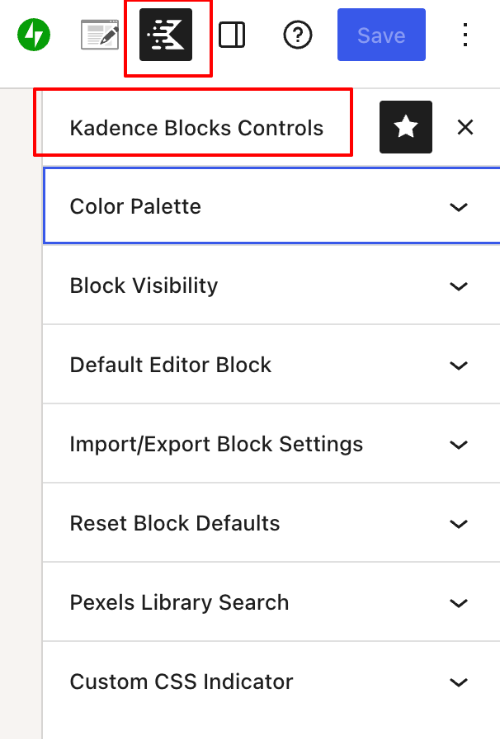
When paired with Kadence Pro Blocks. You get:
- Advanced layout controls
- Responsive design options
- Better content presentation
- Cleaner markup than most page builders
When you click the “Block Visibility” option, you will see the following settings on the right side, allowing for deeper customization of your personal branding. Check the reference image below!
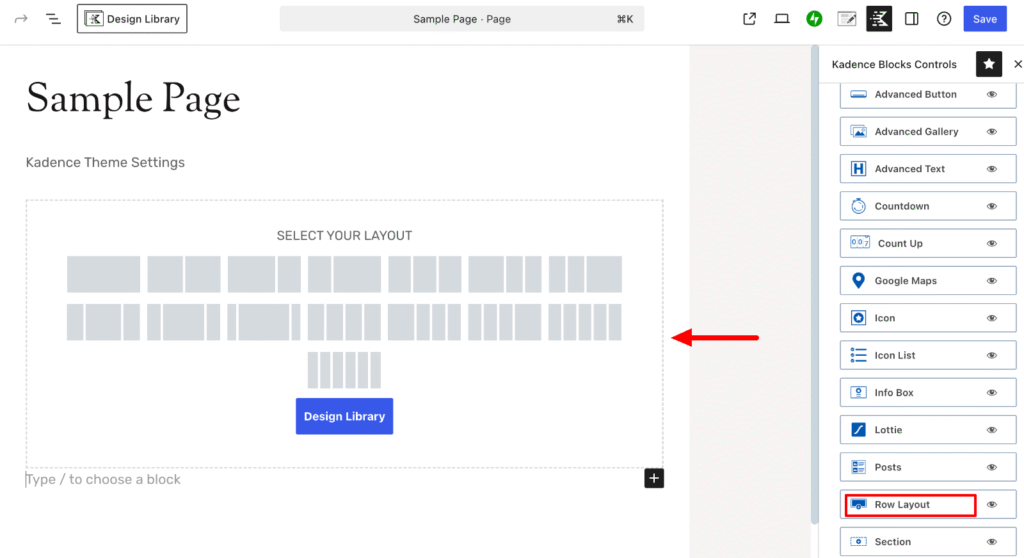
I admire the powerful features of Kadence Blocks Pro, such as a premium design library, conditional display, dynamic content, and custom fonts and icons. When you require more controls and enhanced visuals, the premium version is your best choice.
If you prefer not to buy the Kadence bundle, you can get the Pro blocks with a 10% discount. i.e
- Regular Price – $119/yr
- Offer Price – $107.10/yr
Pros and Cons of Kadence Theme
Pros
- Extremely fast and lightweight
- SEO-friendly structure
- Excellent Gutenberg integration
- Powerful customization without code
- Clean, professional design approach
- Great long-term scalability
Cons
- Some advanced features require Pro
- Starter templates are fewer than Astra
- May feel “too minimal” for users wanting flashy designs
Kadence WordPress Theme – FAQs
Is Kadence Theme beginner-friendly?
Yes. Kadence Theme is very beginner-friendly. Most customization is done through the WordPress Customizer with live previews, and no coding knowledge is required. At the same time, it offers enough depth for advanced users and developers.
Who Should Use Kadence Theme?
I recommend Kadence for:
Professional bloggers
Affiliate marketers
Content-heavy niche sites
SEO-focused projects
Agencies and freelancers
Anyone who values speed and clean design
Do I need Kadence Blocks to use Kadence Theme?
No, Kadence Blocks are not required. Kadence Theme works perfectly on its own with default WordPress blocks. However, installing Kadence Blocks provides more layout flexibility and advanced design options, making it easier to build custom pages without the need for a page builder.
Is Kadence Blocks Only for the Kadence Theme?
No! Kadence Blocks works with:
Astra
GeneratePress
OceanWP
Default WordPress themes
However, when used with Kadence Theme, the design feels more consistent, especially with colors, fonts, and spacing.
Kadence Theme: My Honest Opinion
In my Kadence WP theme review, I have shared my honest experience! It’s not a sales pitch, not a copied feature list, but a practical breakdown from a blogger and theme designer’s perspective.
The settings were where I expected them to be, and its customizer was responsive and logical. Instead of tweaking endlessly, I found myself focusing on what really matters to improve user experience.
After years of blogging and testing WordPress themes, I can say this confidently:
Kadence Theme is one of the best WordPress themes available today for serious bloggers and SEO-driven websites.
It doesn’t chase trends.
It doesn’t rely on gimmicks.
It focuses on performance, structure, and usability, which is exactly what long-term projects need.
If you want a theme that:
- Loads fast
- Scales with your site
- Plays nicely with SEO
- Doesn’t lock you into bad design decisions
Kadence is absolutely worth considering. Don’t wait! Achieve a professional site design and enhanced user experience with this superfast WordPress theme.