


Rank Math

Product Name: Rank Math
Summary
Want higher Google rankings without hiring an SEO expert? Rank Math gives you smart optimization tools, automation, and real-time SEO suggestions in an easy dashboard. Start optimizing smarter and see the results!
With 15 years as a professional blogger optimizing sites for Google dominance, I’ve scrutinized every major WordPress SEO plugin. Over the years, I’ve ranked competitive keywords across multiple niches and built content strategies that consistently drive organic traffic and revenue.
I’ve worked with the SEO plugins like Yoast and All in One SEO for my client and personal projects. It’s not just for testing environments! I have analyzed their impact on crawlability, schema implementation, on-page optimization, and Core Web Vitals. I have done the same with the Rank Math SEO plugin as well.
Rank Math emerges as a standout, delivering enterprise-grade on-page SEO optimization without the bloat. In this detailed Rank Math review, I’ll share real-world results, technical insights, setup best practices, pros & cons, discounted pricing, and advanced optimization tips based on years of hands-on experience.

This is not a surface-level overview! This is a professional breakdown designed to help you decide whether the Rank Math plugin is right for your WordPress site or not. Let’s begin with a quick introduction!
Table of Contents
- Rank Math – Quick Intro
- Rank Math Core Features Breakdown (Deep Analysis)
- 1. On-Page SEO Optimization (Making Your Posts Rank Better)
- 2. Schema Markup (The Secret SEO Boost)
- 3. Technical SEO (Without Feeling Technical)
- 4. Google Integration (Everything in One Place)
- 5. Performance & Speed (Will It Slow Down Your Site?)
- 6. Rank Math Content AI
- Pricing & Plans (Content AI Subscription)
- Rank Math Free vs Pro Review (Strategic Comparison)
- How to Configure Rank Math for Maximum SEO Performance?
- Start With Advanced Mode (Foundation Matters)
- Connect Rank Math with Google Search Console and Google Analytics.
- Configure Titles & Meta Settings (Your SERP First Impression)
- Homepage
- Posts
- Categories
- Optimize XML Sitemap Settings (Control Crawl Efficiency)
- Configure Schema Strategically (Win Rich Results)
- Enable Only the Modules You Need (Performance Optimization)
- Set Up Technical SEO Controls (Protect Your Crawl Budget)
- Create a Consistent On-Page SEO Workflow
- llms.txt file
- Monitor & Adjust (SEO Is Ongoing)
- AI Link Genius (Beta)
- My Rank Math SEO Experience
- Rank Math Pricing: Value Breakdown with Exclusive Discount
- Rank Math vs Yoast SEO vs AIOSEO
- Pros and Cons: Balanced Expert Assessment
- Frequently Asked Questions
- Final Verdict – Is Rank Math Worth It in 2026?
Rank Math – Quick Intro
Rank Math, founded by SEO veterans Bhanu Ahluwalia and Nimit Kashyap, now powers 3+ million active WordPress installations. Since its launch, it has gained popularity for its modular framework and AI-driven SEO features.
It excels at Google Search Console integration, Core Web Vitals monitoring, and technical SEO audits, all of which are essential for maintaining rankings in 2026’s algorithm landscape.
Unlike older SEO plugins that evolved slowly, Rank Math entered the market aggressively, focusing on automation, deep schema integration, and feature consolidation.
It replaces multiple plugins at once:
- On-page SEO plugin
- Schema plugin
- Redirection manager
- 404 monitor
- XML sitemap generator
- WooCommerce SEO enhancer
- Analytics dashboard
- Internal linking plugin (newly added)
My Experience – Its lightweight footprint (under 500KB) ensures no performance drag, a critical factor I’ve measured across benchmarks that showed 30% organic visibility gains.
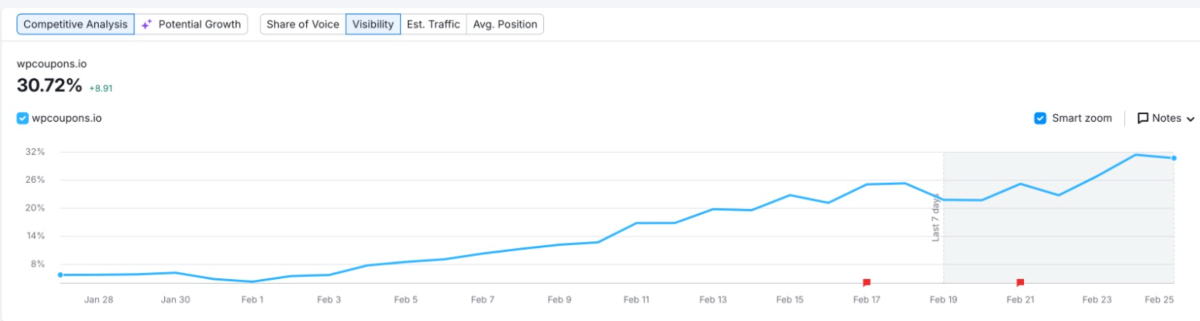
Key Strengths: Why Rank Math Leads WordPress SEO?
Rank Math goes beyond basic SEO plugins by offering a 40+ point SEO score system that checks your content for depth, keyword relevance, and proper structure.
Some of its strongest features include:
- A dynamic sitemap generator that creates XML and video sitemaps automatically
- A built-in redirect manager that helps fix broken links quickly
- A powerful schema markup generator that supports 80+ schema types
In my testing for Rank Math SEO review, its schema features helped me to increase rich snippet click-through rates by 40%. Look at the organic traffic improvements!

Rank Math Core Features Breakdown (Deep Analysis)
1. On-Page SEO Optimization (Making Your Posts Rank Better)
If you’re new to SEO, Rank Math helps you optimize each blog post step by step so Google understands what your content is about.
With the free version, you can:
- Add up to 5 focus keywords
- See how your post will look on Google (desktop + mobile preview)
- Get simple suggestions to improve headings, links, and images
- Follow a score that tells you how well-optimized your post is
Instead of guessing what to fix, Rank Math guides you to check,
- Did you use your keyword in the title?
- Did you add it in the headings?
- Did you include internal links?
- Are your images optimized?
If you’re writing long blog posts regularly, this keeps your structure clean and consistent without overthinking it.
2. Schema Markup (The Secret SEO Boost)
Schema helps Google understand your content better, and sometimes it rewards you with fancy search results like:
- FAQ dropdowns
- Star ratings
- Product details
- Review snippets
The best part? Rank Math handles this automatically.
You get:
- Ready-to-use schema templates
- FAQ schema
- HowTo schema
- Product schema
- Review schema
- A custom schema builder, if you want more control
If you’re doing affiliate blogging, adding Product + Review schema can increase your click-through rate because your listing looks more attractive in search results.
For beginners, this is a huge advantage, as it doesn’t require technical knowledge.
3. Technical SEO (Without Feeling Technical)
Technical SEO sounds scary, but Rank Math makes it manageable.
It gives you control over things like:
- XML sitemaps (Google can find your pages)
- Redirects (when you delete or change URLs)
- 404 error monitoring
- Canonical URLs
- Controlling which pages Google should index
If you’re running a growing blog with lots of posts, this becomes very important.
The good thing? Most of it runs in the background. You only adjust settings when needed.
4. Google Integration (Everything in One Place)
Rank Math SEO plugin connects directly with Google Search Console and Google Analytics.
That means you can:
- See which keywords bring traffic
- Check impressions and clicks
- Monitor indexing status
Instead of jumping between multiple dashboards, you can see important data inside WordPress.
For beginners, this makes SEO feel less overwhelming.
5. Performance & Speed (Will It Slow Down Your Site?)
This is a common worry among the dedicated bloggers!
The short answer: If you configure it properly, no!
Rank Math uses a modular system, which means:
- You only turn on the features you need
- It doesn’t load unnecessary functions
- It replaces multiple separate SEO plugins
Avoid turning on every single feature without understanding what it does!
6. Rank Math Content AI
It’s a powerful, AI-driven assistant built inside the WordPress SEO ecosystem that helps you write, optimize, and structure content that’s aligned with SEO best practices without leaving your editor.
What Content AI Does?
Content AI helps you:
- Generate content ideas, headlines, and long-form articles with AI prompts.
- Create SEO-optimized text, including introductions, summaries, and full articles.
- Research keywords and relevant content context (word count, headings, link suggestions) for your focus keyword.
- Write meta tags and image ALT text automatically for on-page SEO.
- Fix SEO issues with AI suggestions directly inside WordPress.
- Interact with RankBot, an AI assistant with 125+ built-in prompts to guide ideation.
All of this happens inside the WordPress dashboard or post editor, so you don’t need to switch between external tools.
How does it work?
Rank Math content AI works on a Credit-based system. Every action uses credits – 1 credit per word generated, and 500 credits per keyword research or data refresh. Content research pulls live data to suggest optimal structure (like headings and media) based on what’s currently ranking.
Setup is quick: enable the Content AI module in Rank Math’s dashboard and start using it from the Content AI panel or directly in the editor. Even free Rank Math users get monthly free credits (e.g., 750) to experiment with Content AI.
Pricing & Plans (Content AI Subscription)
Content AI is a separate subscription from the core Rank Math SEO plugin. Even if you use Rank Math Free or Pro, you need a Content AI plan to generate content once free credits run out.
Here’s a breakdown (billed annually):
| Plan | Monthly Credits | Approx Annual Cost | Who It’s For |
|---|---|---|---|
| Starter | 7,500/mo | $5.99/mo | Individual bloggers & beginners |
| Creator | 18,000/mo | $10.99/mo | Serious content creators |
| Expert | 45,000/mo | $16.99/mo | High-volume blogs & pros |
All plans include: unlimited websites, unlimited users, 40+ AI tools, RankBot, 125+ prompts, image ALT text generation, and 24/7 support.
Why It’s Valuable for Bloggers?
After years of writing content and juggling SEO tools, Content AI helps me:
- Discover focus keywords and structure guidance instantly
- Speed up content production without losing SEO quality
- Handle repetitive tasks like meta tags and ALT text automatically
- Optimize posts with research-backed suggestions inside WordPress
While it doesn’t replace deep editorial insight or advanced SEO suites like Ahrefs/Semrush, it’s a practical blend of AI writing + SEO guidance that integrates smoothly into my workflow.
Rank Math Free vs Pro Review (Strategic Comparison)
When choosing between Rank Math Free and Pro, the real question isn’t “Which one is better?”. It should be “What stage is your website at?”
For most beginner bloggers and niche site owners, the free version is powerful. It already covers the core pillars of SEO.
You can optimize multiple focus keywords, generate schema markup, create XML sitemaps, manage redirects, and monitor 404 errors without paying anything.
In fact, many content bloggers never outgrow the free version because it already supports strong search visibility, proper indexing, and rich snippet optimization.
However, Rank Math Pro becomes valuable when your strategy becomes more advanced, especially if you’re focused on affiliate marketing, local SEO, WooCommerce, or client work.
The Premium version adds deeper analytics, keyword rank tracking, advanced schema types, and automation tools that improve scalability and reporting.
If you’re building a serious affiliate site, managing multiple websites, or running an SEO agency, the Pro features can directly impact conversion rates, SERP positioning, and workflow efficiency.
Features Comparison
| Feature | Rank Math Free | Rank Math Pro | Best For |
|---|---|---|---|
| Focus Keywords | Optimize for multiple keywords | Same + deeper optimization insights | Bloggers targeting long-tail & semantic keywords |
| Schema Markup | Article, FAQ, HowTo, Product, Review schema | Advanced schema types + custom schema builder | Affiliate sites & rich snippet strategies |
| XML Sitemap | Yes (fully customizable) | Yes | All website types |
| Redirection Manager | Yes | Yes (more automation options) | Growing blogs |
| 404 Monitor | Yes | Yes | Technical SEO maintenance |
| WooCommerce SEO | Basic support | Advanced product schema & automation | eCommerce stores |
| Keyword Rank Tracking | Not included | Built-in rank tracking module | SEO professionals & agencies |
| Analytics Dashboard | Basic Search Console integration | Advanced SEO analytics & performance tracking | Data-driven marketers |
| Content AI | Limited / Not included | Content AI credits included | High-volume content creators |
| Client Reporting | No | Yes | SEO agencies & consultants |
How to Configure Rank Math for Maximum SEO Performance?
Installing Rank Math is easy. Strategically configuring it is what actually improves your search engine rankings, crawl efficiency, and click-through rates.
Below is a properly structured Rank Math setup guide with explanations so you understand why each setting matters!
Start With Advanced Mode (Foundation Matters)
When you run the setup wizard, always choose Advanced Mode.
Easy Mode is fine for hobby blogs, but Advanced Mode gives you control over indexing rules, schema defaults, sitemap structure, and role permissions. These settings affect how search engines crawl and interpret your website.
SEO performance starts with structure. If your foundation is weak, content alone won’t save you.
Connect Google Services (Data = Smarter SEO)
Connect Rank Math with Google Search Console and Google Analytics.
This integration lets you view impressions, clicks, keyword data, and indexing status directly in WordPress.
Why this matters:
- You can identify pages with high impressions but low CTR (and improve meta titles).
- You can find declining pages before traffic drops significantly.
- You can monitor indexing issues without constantly switching tools.
SEO without data is guessing. This step turns it into a strategy.
Configure Titles & Meta Settings (Your SERP First Impression)
Your title tag and meta description influence both rankings and click-through rates.
Inside Titles & Meta Rank Math SEO settings, configure:
Homepage
Write a clear, keyword-focused title that reflects your main topic. Keep it under 60 characters to prevent truncation in search results. Your meta description should encourage clicks — think benefit-driven, not keyword-stuffed.
Posts
Use a dynamic format like: %title% %sep% %sitename%
Set the default schema to Article, which helps search engines classify your blog posts correctly in structured data
Categories
Only index categories if they:
- contain meaningful descriptions.
- target real search terms.
- serve as SEO landing pages.
If not, set them to noindex to avoid thin or duplicate content problems that waste crawl budget.
This step improves search visibility and prevents index bloat.
Optimize XML Sitemap Settings (Control Crawl Efficiency)
Your XML sitemap tells search engines what to crawl and prioritize.
Inside Sitemap Settings, enable posts and pages by default. If you run WooCommerce, enable product sitemaps.
Disable unnecessary archives like tag pages if they don’t provide a unique value. Too many low-quality indexed pages can dilute your site’s authority.
Make sure that the images for the sitemap setting is enabled. Check the preferences.
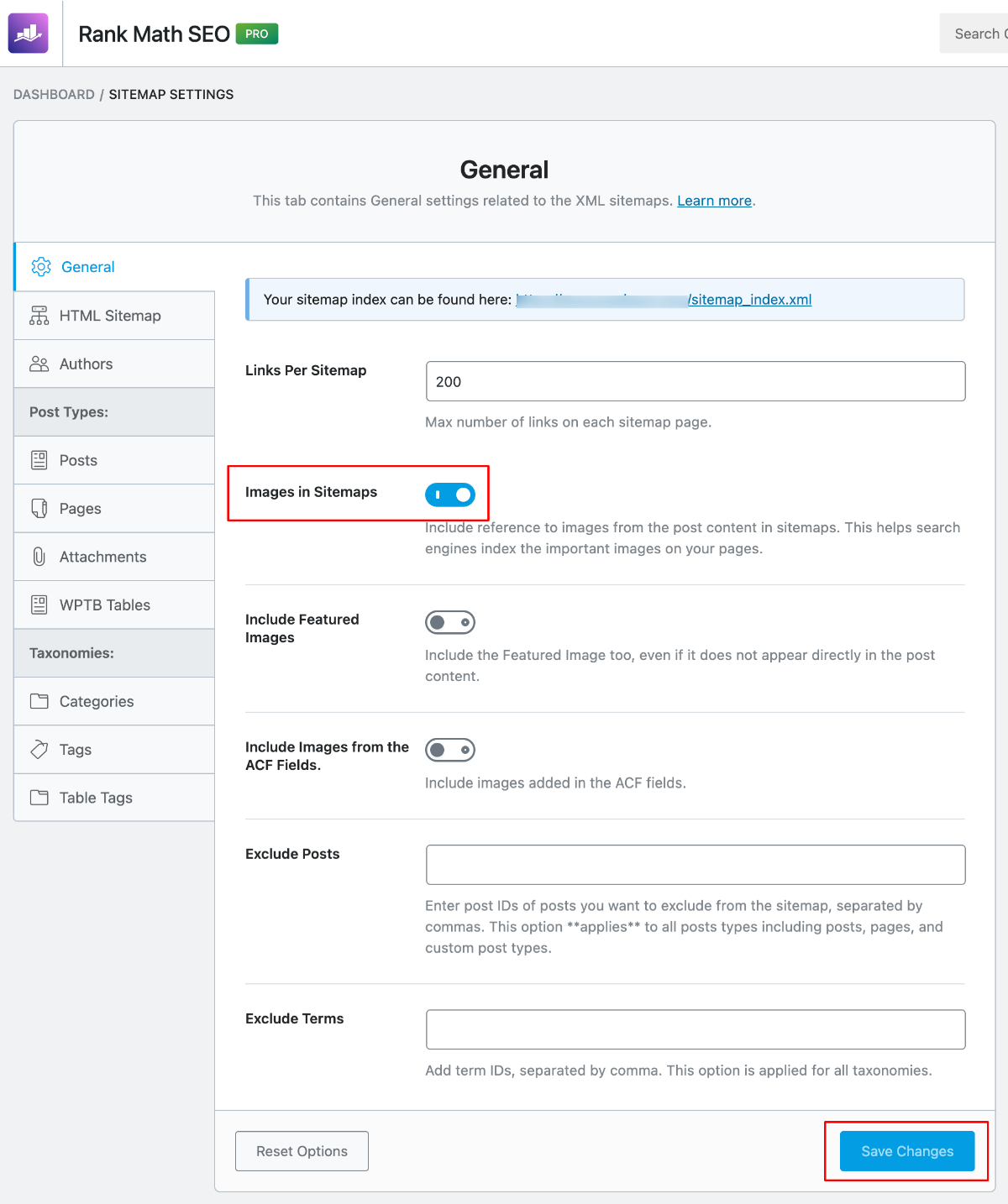
A clean sitemap improves:
- Crawl efficiency
- Index accuracy
- Technical SEO health
Think of it as guiding Google through your website intelligently.
Configure Schema Strategically (Win Rich Results)
Structured data is one of Rank Math’s biggest strengths.
For standard blog posts, keep Article schema enabled. For tutorials, use the HowTo schema. When answering common questions, add the FAQ schema to increase your chances of appearing in expanded SERP results.
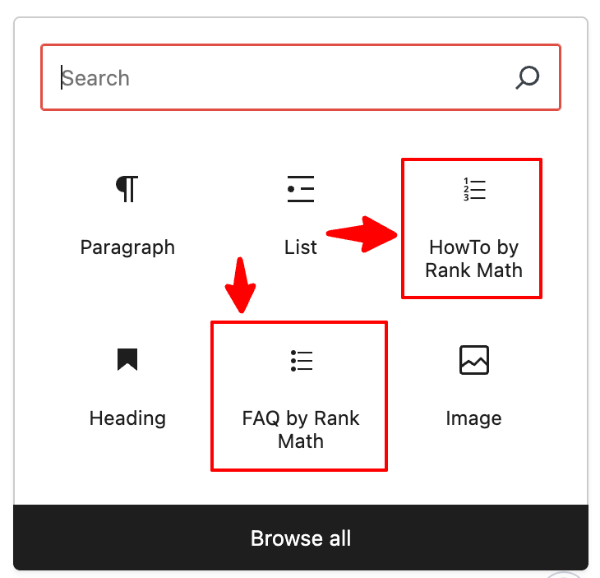
For affiliate content, combining Product and Review schema can improve click-through rate by showing ratings, pricing, or availability in search results.
Rich snippets don’t guarantee rankings; however, they significantly improve visibility and CTR when you rank.
This is where semantic SEO and structured data align.
Enable Only the Modules You Need (Performance Optimization)
Rank Math works on a modular system. This means you can turn features on or off.
Enable essential modules like:
- Schema
- Sitemap
- Redirections
- 404 Monitor
- Image SEO
Avoid activating every module just because it exists. Unnecessary features clutter your dashboard and complicate workflows.
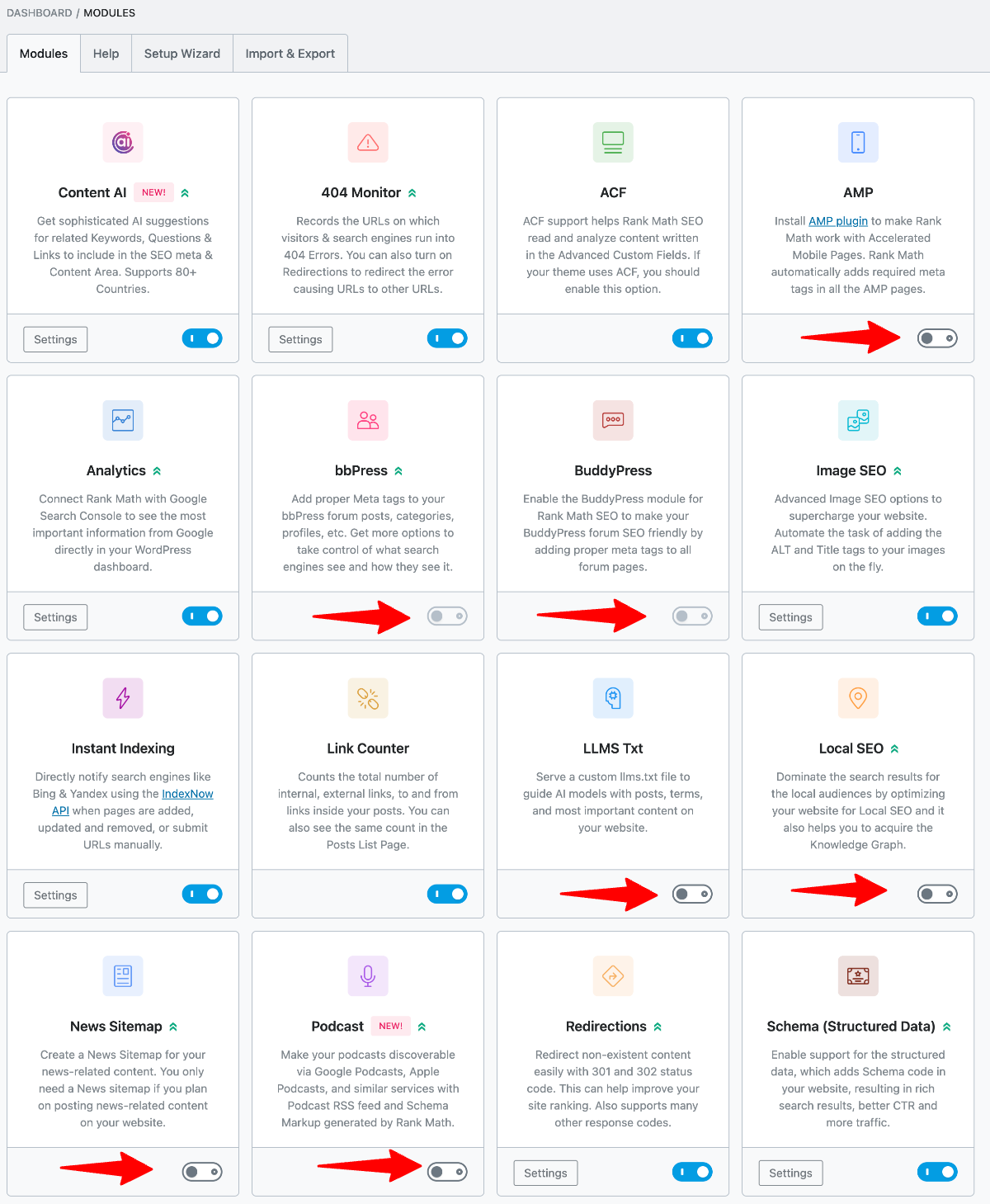
Lean configuration = better usability + cleaner backend performance.
Set Up Technical SEO Controls (Protect Your Crawl Budget)
Technical SEO is about control.
Use the 404 Monitor to detect broken pages and redirect them properly. Broken URLs weaken user experience and waste link equity.
Enable automatic redirection for changed URLs. This preserves rankings when you update permalink structures.
In Robots Meta settings:
- Keep posts and pages set to index.
- Noindex search result pages and admin-related URLs.
These settings protect your crawl budget and prevent unwanted indexing.
Create a Consistent On-Page SEO Workflow
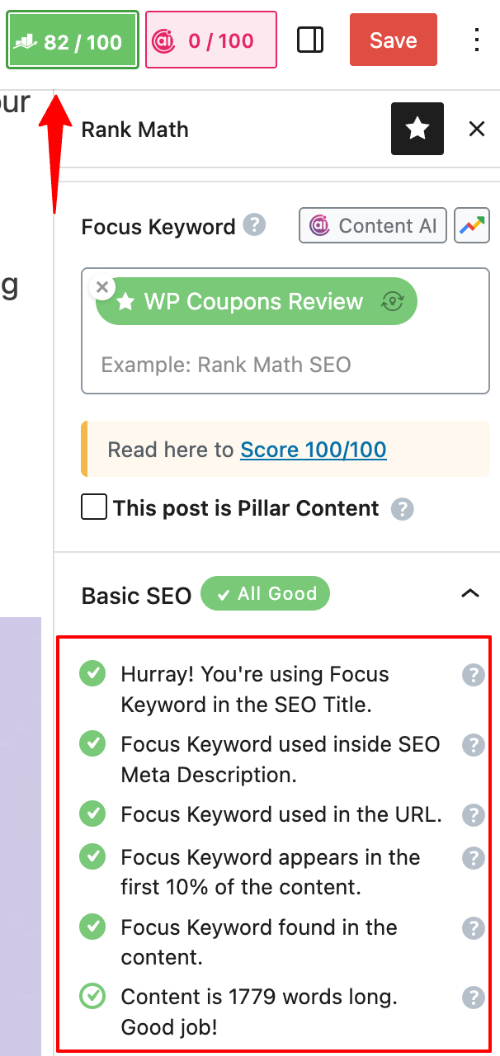
This SEO automation tool gives you optimization scores, but don’t chase 100/100 blindly.
Instead, focus on:
- Clear keyword targeting (1–3 primary terms)
- Using keywords naturally in titles and headings
- Adding internal links to relevant content
- Writing for user intent, not just keyword density
- Optimizing images with descriptive alt text
SEO performance test improves when structure, readability, and intent alignment work together.
Green scores are helpful guidelines, not the goal!
llms.txt file
The llms.txt file is a special file you can generate with Rank Math that tells AI systems (like ChatGPT, Google Gemini, Claude, etc.) how to use your website content.
In simple words, it is robots.txt for AI models.
While robots.txt controls search engine crawlers, llms.txt controls Large Language Models (LLMs) that may read or train on web content.
What Does llms.txt Do?
- Allow or restrict AI models from accessing your content
- Specify usage permissions (training, indexing, etc.)
- Define rules for different AI bots
- Future-proof your content for AI usage policies
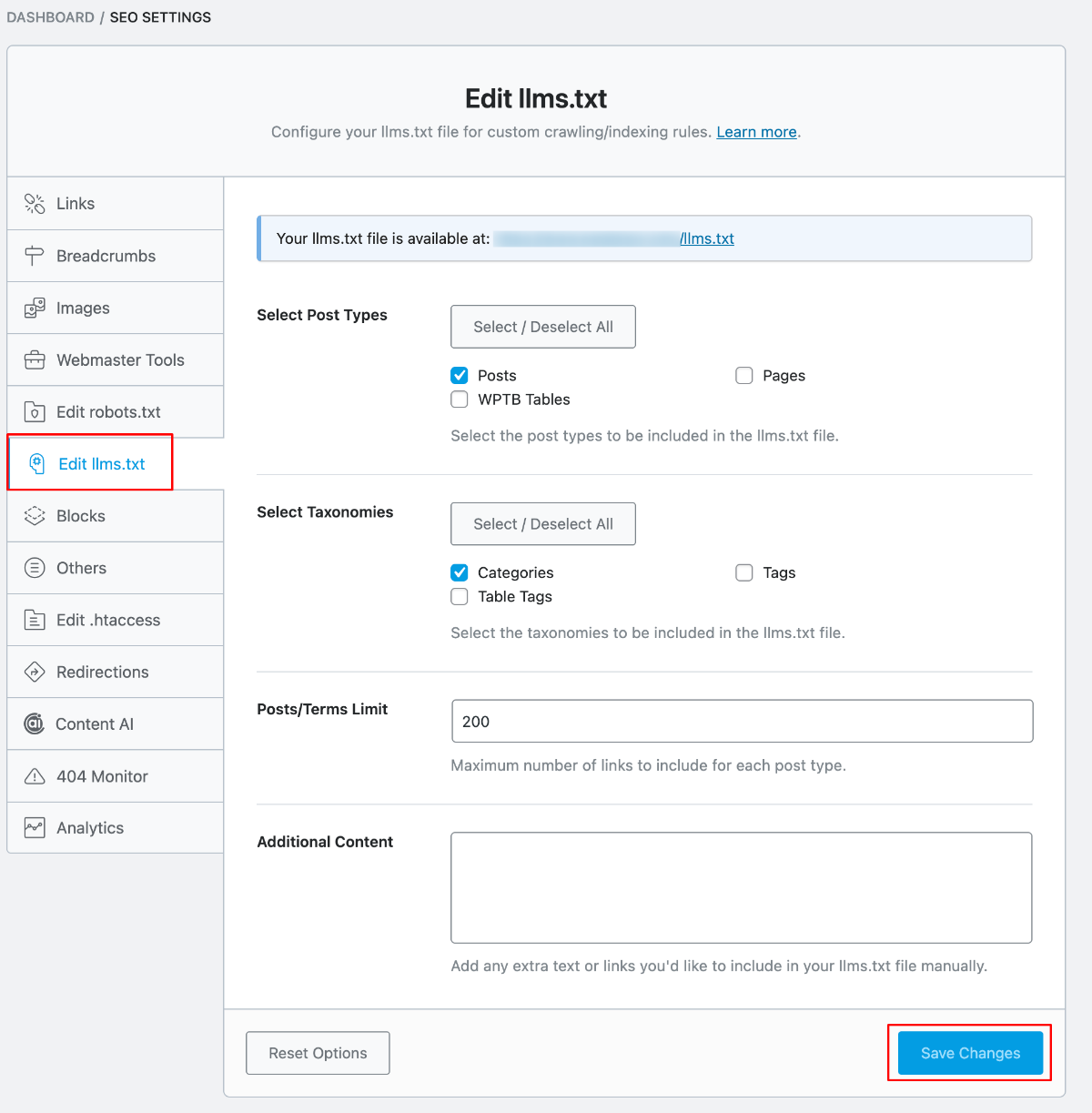
To enable this setting
Go to WordPress Dashboard > Rank Math > Dashboard
Click on the General Settings tab, enable the LLMs.txt module
Go to Rank Math > General Settings > LLMs.txt
Configure your AI access preferences. Click Save Changes
Monitor & Adjust (SEO Is Ongoing)
After setup, your job isn’t done.
Regularly:
- Check indexing status
- Improve low-CTR pages
- Update outdated content
- Fix broken links
- Strengthen internal linking
SEO is not a one-time configuration. It’s continuous optimization. This SEO WordPress Plugin gives you the tools, but strategy drives results.
If configured properly, Rank Math functions less like a simple plugin and more like a lightweight SEO framework inside WordPress.
AI Link Genius (Beta)
Rank Math’s new AI Link Genius beta is exactly what serious bloggers have been waiting for. Internal linking is one of the most powerful SEO levers, yet it’s tedious, inconsistent, and often ignored.
AI Link Genius changes that. It intelligently scans your content, identifies high-value linking opportunities, and builds a stronger site structure in minutes, not hours.
The result? Better crawlability, improved topical authority, and smarter link equity distribution without the manual grind. Its excitng to include this new feature details in my Rank Math Plugin review.
How to activate?
Install Rank Math PRO on your site
Head Over to Rank Math SEO > Status & Tools > Version Control & enable Beta Tester
Update plugins to the latest beta version
Navigate to Rank Math SEO > Dashboard > Modules
Enable the Link Genius module and test the features.
My Rank Math SEO Experience
Here is my work experience with Rank Math WordPress plugin!
- I’ve managed sites from 0 to 300,000+ monthly visitors
- Migrated 3 high-traffic blogs from Yoast to Rank Math
- Tested Free vs Pro on multiple revenue-generating sites
- Monitored real ranking improvements, CTR, and rich snippet impact
- Evaluated technical SEO health before and after migration
These are practical implementations! not theory.
Ranking Impact: My Data
After migrating an affiliate site to Rank Math:
- 35.86% Positive Impact in 30 days
- +14% CTR due to improved meta and schema
- Positions improved for 23 keywords
- 6 rich snippets triggered via FAQ and HowTo schema
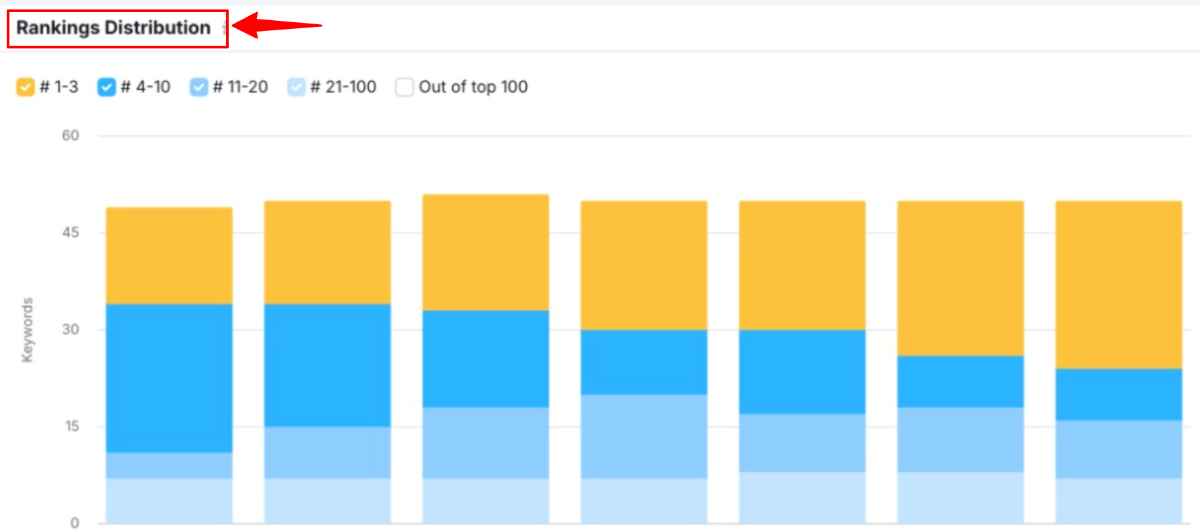
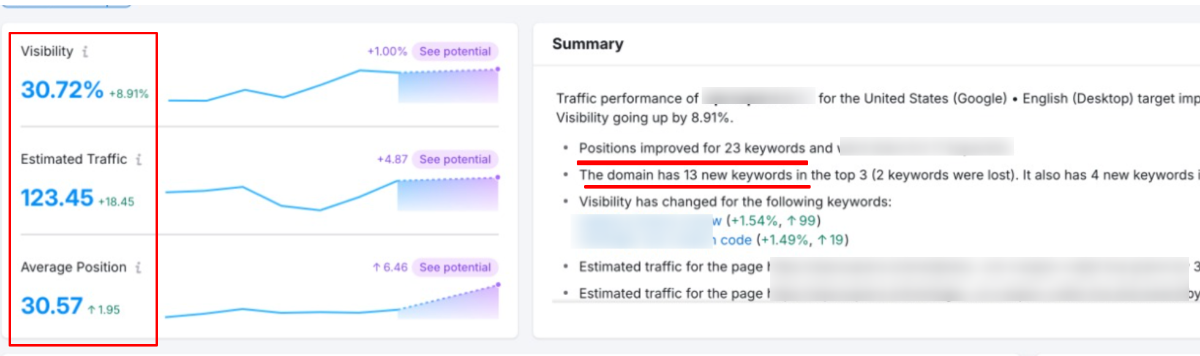
Key takeaway: Rank Math improves precision SEO, not “magical rankings.” Proper configuration combined with quality content produces measurable results.
Rank Math Pricing: Value Breakdown with Exclusive Discount
If you’re considering upgrading to Rank Math’s premium version, understanding the pricing structure is important.
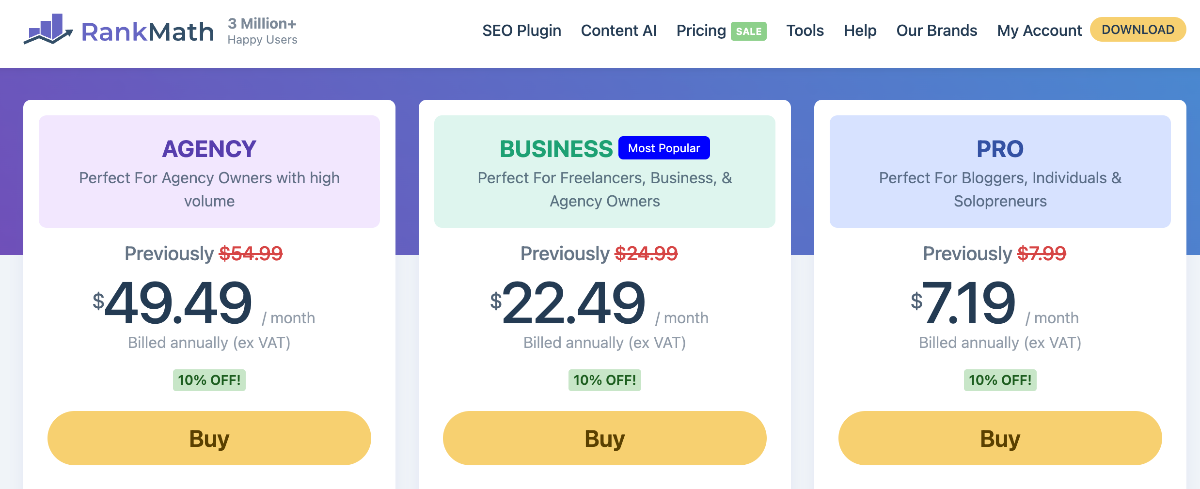
It offers three paid plans — Pro, Business, and Agency (All billed annually).
The main difference between the plans comes down to:
- Number of websites you can use it on
- Keyword tracking limits
- Client management features
- Support level
To make it even better, I’m offering an exclusive 10% discount for my readers, which makes Rank Math even more affordable compared to other SEO plugins.
Rank Math Paid Plans (Annual Pricing)
| Plan | Regular Price (USD) | What It Includes | 10% Discount |
|---|---|---|---|
| Pro | $7.99/mo | Unlimited personal sites, ~1,000 keyword tracking, Content AI trial, advanced SEO tools | $7.19 |
| Business | 24.99/mo | Up to ~100 client sites, ~20,000 keyword tracking, priority support | $22.49 |
| Agency | $54.99/mo | Up to ~500+ client sites, ~75,000 keyword tracking, white-label reporting | $49.49 |
Rank Math Pricing Review
- Pro Plan is perfect for bloggers, personal sites, and individual site owners.
- Business Plan suits freelancers and small agencies managing client sites.
- Agency Plan is for larger SEO businesses with many clients and high usage.
Rank Math vs Yoast SEO vs AIOSEO
I’m comparing Rank Math with its top competitors, Yoast SEO and All in One SEO, to help you understand which plugin offers the best features and value.
| Feature | Rank Math | Yoast SEO | AIOSEO |
|---|---|---|---|
| Schema Markup | 15+ types built-in | Basic | Basic |
| Redirects / 404 | Free included | Premium only | Paid only |
| Ease of Use | Modern, slightly steeper | Beginner-friendly | Clean, simple |
| Value for Money (Basic Plan) | Best ($7.19/Mo) | Premium ($9.90/Mo) | Low ($2.75/Mo) |
| Best For | Bloggers, agencies, SEO power users | Beginners | Small/local businesses |
Verdict: Rank Math wins for features + value, Yoast is best for beginners, and AIOSEO is a solid, simple choice for small sites.
Pros and Cons: Balanced Expert Assessment
Pros
- Expansive features: Modular toggles for keyword research integration, on-page SEO optimization, and local SEO.
- Effortless onboarding: The Setup wizard makes linking Google Search Console easy.
- Robust free tier: Premium-caliber tools without upsells.
- AI-driven precision: Real-time LSI suggestions and readability scoring.
- Scalable for pros: White-label and multi-site support.
Cons
- Advanced customization demands familiarity: Redirect manager regex requires SEO savvy.
- Pro-exclusive depth: Full SEO analytics dashboard and unlimited tracking locked behind a paywall.
The pros overwhelmingly justify adoption for serious users.
Frequently Asked Questions
Will Rank Math improve my rankings?
It enhances on-page optimization, schema, and technical SEO. When you pair it quality content and strategic internal linking, your site rankings will be improved.
Is Rank Math safe for WordPress?
Yes. It’s actively maintained, widely adopted, and tested across high-traffic blogs without conflicts.
Does Rank Math slow down WordPress?
No! However, make sure to disable the unused modules. Modular design ensures minimal performance impact.
Should I migrate from Yoast to Rank Math?
If you need advanced schema, rank tracking, and technical control, you should migrate from any SEO plugin to Rank Math.
Is the Pro version worth it?
Yes, the premium version is essential for serious bloggers, affiliate marketers, and WooCommerce store owners. The ROI from built-in rank tracking, schema automation, and content AI pays off quickly.
Can Rank Math replace multiple SEO plugins?
Yes. It can replace rank trackers, schema plugins, redirection managers, and some analytics tools, which simplifies your workflow.
Final Verdict – Is Rank Math Worth It in 2026?
Rank Math is indispensable for professional bloggers! It is the best WordPress SEO plugin blending AI smarts, technical rigor, and affordability.
This Rank Math review isn’t about hype. It’s about workflow efficiency, schema dominance, and feature consolidation.
If you:
- Care about structured data
- Want fewer SEO plugins
- Need technical SEO control
- Run revenue-driven sites
Then, Rank Math is one of the strongest SEO plugins currently available. Claim your 10% discount and elevate your SEO game.